Secondary motion you can export from Blender
Jiggle in a render is easy. Jiggle that has to leave Blender is harder: a bake that changes with the frame rate, a loop that pops at the seam, a thousand keyframes on every bone. Jiggle Bake is built around those problems and around the export step.
- NOMINAL Runs in Blender on your computer
- READY Your original action is not touched
What it does
Chains and presets
Select the bones of a chain in Pose Mode, pick Hair, Tail, Ears or Cloth strip, then adjust stiffness, damping, gravity, drag, tip falloff and collision radius.
Colliders and preview
Pick objects as colliders: spheres and capsules, and animated colliders are followed between frames. Live Preview runs the same solver as the bake.
Bake to keyframes
The result goes into a copy of your action named <action>_Jiggle. Key reduction within a rotation tolerance you set took one test chain from 3,992 keys to 1,604, every channel within 0.002 of the full bake.
Settling and loops
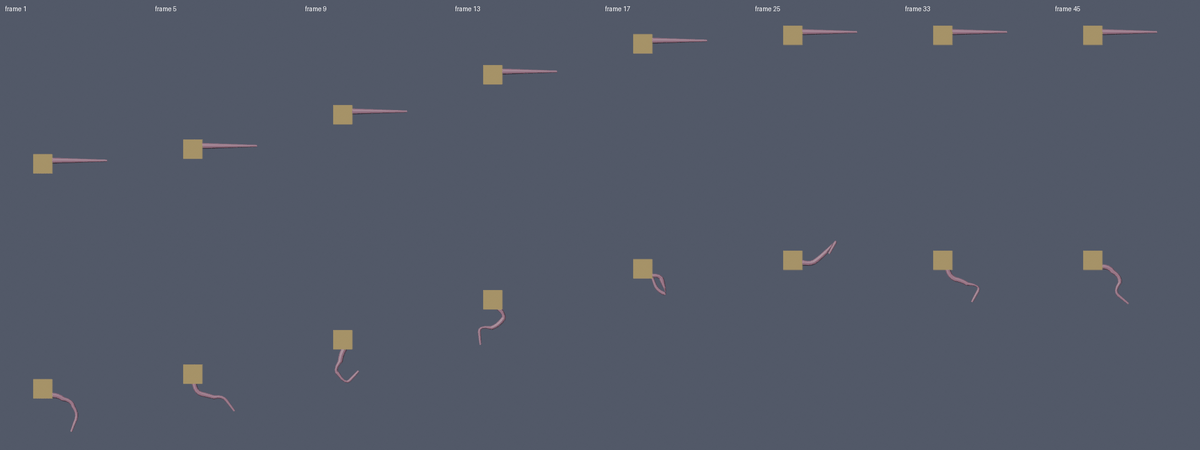
A settling period before frame 1, so the first frame is not a cold start. A loop option runs one unrecorded pass first, so a looping animation starts already in motion.
Frame rate
Each frame is split into fixed sub-steps of at most 1/120 s. A 24 fps and a 60 fps bake of the same test motion put the tip within 0.4 mm of each other. Baking the same thing twice gives identical keys, and bone lengths do not stretch.
One-button FBX export
Fixed settings: armature and child meshes only, no leaf bones, apply scale, forward -Z and up Y, only the active action, deform bones only.
Who it is for
- Animators and game artists who add hair, tails, ears or cloth strips to a rig and need the motion as keyframes.
- People who export animation from Blender as FBX.
Honest limits
- Colliders are spheres and capsules and only act on bone tips. No mesh colliders and no bone-to-bone collision.
- Chains only: no branching, wind, cloth or soft body. Rotation only; bones are not stretched or moved.
- The exported FBX was checked by importing it back into Blender. It has not been opened in Unity, VRChat or Unreal.
- Tested on Blender 4.2.x only. Blender 5.x is untested.
- Not affiliated with the Blender Foundation.
Details
- Included: The extension zip. Needs Blender 4.2 LTS: Edit > Preferences > Get Extensions > arrow menu > Install from Disk. GPL-3.0-or-later.
14 checks in headless Blender 4.2.2 on Windows, all passing. Blender 5.x is untested. Questions? Support.