One workbook for a freelancer's invoices, expenses and tax set-aside
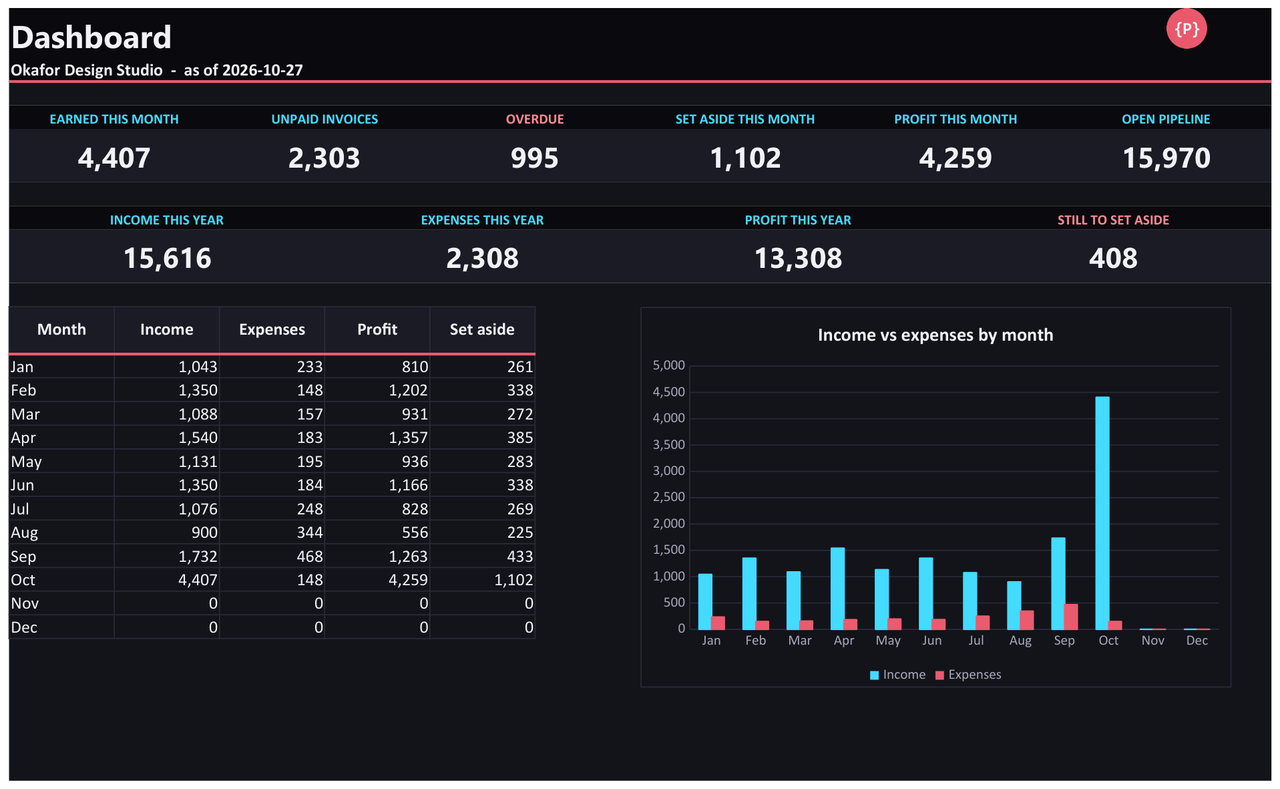
Log your hours and the invoice builds itself. Record what you were paid and what you spent, and the dashboard shows this month's earnings, unpaid and overdue invoices, profit and the amount to put aside.
- NOMINAL Your data stays in your file
- READY Excel .xlsx, no macros
What it does
Hours to invoice
Log work by start and end time, or type the hours, and the client's rate fills in. Write an invoice number on the entries you are billing and a printable invoice appears with a line for each one.
Expenses with receipts
One row per cost, with a category you can rename and a link to the receipt. Rows without a link show "Missing".
Income counted when it is paid
Monthly income, expenses and profit follow the Paid on date, not the invoice date. Retainers and card payments that never had an invoice go on their own sheet.
A tax set-aside calculator
You choose a percentage. The sheet applies it to every payment you received, keeps a running total and compares it with what you typed in as actually moved. It is a calculator, not tax advice.
Who it is for
- Freelancers and sole traders who bill by the hour or by the job and want invoices, expenses and payments in one file.
- People who would rather own a spreadsheet than pay a monthly subscription.
- Anyone who wants a clear answer to "how much of this should I leave alone for tax?" without a bookkeeping package.
Honest limits
- The tax set-aside is a calculator, not tax advice. It does not know your country, allowances or deadlines, and it does not work out what you owe. Ask a qualified adviser which percentage is right for you.
- The formulas were recalculated and checked against independent calculations in LibreOffice. It has not been tested in Microsoft Excel or Google Sheets, which can import the .xlsx file.
- Room for 1,000 time entries, 30 clients, 60 invoices, 200 other payments, 500 expenses and 100 pipeline rows. One invoice tax rate and one set-aside percentage. Reports cover one calendar year.
- It does not send invoices, take payments or connect to a bank. There are no macros.
Details
- Included: An example workbook with sample data, a blank copy, a README and the licence.
Tested automatically against independent reference implementations. Questions? Support.